
Best AI Tools for System Design Interviews
Boost Your Prep with Automation
System design interviews are among the most challenging parts of the tech hiring process. Whether you’re aiming for a role at Google, Meta, Amazon, or a fast-growing startup, your ability to architect scalable, reliable systems is under the spotlight. But what if you could supercharge your preparation using AI?
In this post, we’ll explore the best AI tools that can help you prepare smarter, faster, and more confidently for system design interviews.
Why Use AI for Interview Prep?
AI tools are transforming how developers learn, practice, and prepare for interviews. They offer:
– Instant feedback on your designs and ideas
– Mock interview simulations
– Architecture brainstorming
– Automated note-taking and planning
These tools not only save time but also help you think more critically and creatively. They allow you to iterate faster, explore multiple design options, and simulate real-world scenarios with minimal setup.
Top AI Tools for System Design Interviews
ChatGPT
– Simulate mock interviews, brainstorm architecture ideas, get feedback on trade-offs.
– Ask follow-up questions and refine your design iteratively.
– Use it to generate architecture diagrams using text-based prompts.
Exponent
– Practice system design questions interactively with guided feedback.
– Access real-world interview questions, video explanations, and peer reviews.
– Tailored for FAANG-level interviews with structured learning paths.
GitHub Copilot
– Generate boilerplate code for system components, APIs, and backend logic.
– Speeds up prototyping and helps visualize how components interact.
– Integrates with IDEs for seamless development experience.
Notion AI
– Organize your interview prep, take notes, and summarize architecture patterns.
– Create a personal knowledge base of system design concepts.
– Automate reminders and checklist generation.
Comparison Table
Here’s a quick comparison of the top AI tools:
Tool | Best For | Pricing | Unique Feature |
ChatGPT | Mock interviews, brainstorming | Free/Paid | Conversational refinement |
Exponent | Guided practice | Paid | FAANG-specific questions |
GitHub Copilot | Code generation | Paid | IDE integration |
Notion AI | Notes & planning | Free/Paid | Smart summaries & templates |
How to Use These Tools Together
Here’s a sample workflow:
1. Start with ChatGPT: Ask for a system design prompt and brainstorm ideas.
2. Use Notion AI: Document your architecture and trade-offs.
3. Practice on Exponent: Try similar questions and get feedback.
4. Prototype with Copilot: Build quick code snippets to validate your design.
This multi-tool approach mimics real-world design thinking and helps you prepare holistically.
Bonus Tips for AI-Powered Prep
– Use AI to generate diagrams (e.g., draw.io + ChatGPT prompts)
– Ask ChatGPT to critique your design: ‘What are the weaknesses in this architecture?’
– Create a prep checklist in Notion and automate reminders
Real-World Example: Designing a Scalable Chat App
Let’s say you’re asked to design WhatsApp in an interview. Here’s how AI tools can help:
– ChatGPT: Outline components like message queues, user presence, and delivery guarantees.
– Copilot: Generate code for WebSocket connections and message storage.
– Notion AI: Document your design and create a revision history.
– Exponent: Practice similar questions and compare your approach.
How AI Is Transforming Tech Hiring
AI is not just a tool for candidates—it’s also reshaping how companies hire. Recruiters use AI to screen resumes, assess coding skills, and even conduct initial interviews. Understanding how AI fits into the hiring pipeline can give you an edge. By using the same tools that companies rely on, you align your preparation with their expectations.
Free Download: AI-Powered Interview Prep Checklist
Want a step-by-step guide to using AI tools for system design interviews?
👉 [Download the checklist here] (link placeholder)
Final Thoughts
AI won’t replace your thinking—but it will amplify it. By combining your expertise with the power of automation, you can prepare for system design interviews with confidence and clarity.
Have you used any of these tools? Drop a comment below or share your favorite AI-powered prep strategy!
Additional Real-World Example: Designing an E-Commerce Platform
Imagine you’re asked to design a scalable e-commerce platform like Amazon. AI tools can assist in the following ways:
– ChatGPT: Define system components such as product catalog, shopping cart, payment gateway, and order tracking.
– Copilot: Generate code for RESTful APIs, database schemas, and user authentication.
– Notion AI: Organize feature requirements, create architecture documentation, and track design iterations.
– Exponent: Practice similar system design questions and receive expert feedback.
In-Depth Comparison of AI Tools
While all tools offer unique benefits, choosing the right one depends on your goals. ChatGPT excels in ideation and iterative design. Exponent provides structured learning and feedback. GitHub Copilot is ideal for rapid prototyping, and Notion AI helps with organization and documentation.
Combining these tools creates a powerful ecosystem for mastering system design interviews.
Advanced Interview Strategies
To stand out in system design interviews, follow these strategies:
– Start with requirements gathering: Clarify functional and non-functional needs.
– Define system goals: Scalability, availability, consistency, and latency.
– Use layered architecture: Presentation, application, and data layers.
– Discuss trade-offs: CAP theorem, eventual consistency vs strong consistency.
– Validate with examples: Reference real-world systems and their design choices.
Common Pitfalls to Avoid
Many candidates struggle with system design interviews due to:
– Jumping into solutions without clarifying requirements.
– Ignoring scalability and fault tolerance.
– Failing to justify technology choices.
– Overcomplicating the design without addressing core functionality.
Avoid these mistakes by practicing with AI tools and seeking feedback regularly.
Future Trends: AI in Technical Interviews
AI is increasingly being used not only by candidates but also by recruiters. Automated interview platforms now use AI to assess communication, problem-solving, and technical depth.
In the future, we can expect:
– AI-generated personalized interview questions.
– Real-time feedback during interviews.
– Integration of AI into coding platforms for live assessments.
Staying ahead of these trends by mastering AI tools will give you a competitive edge in the job market.
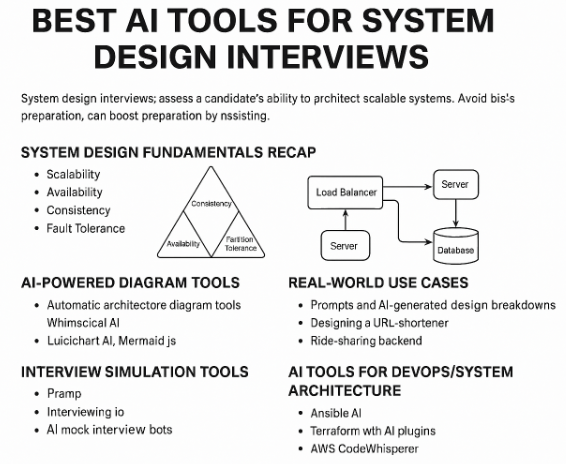
AI Tools for DevOps/System
Architecture
Tools like Ansible AI, Terraform with AI plugins, and AWS CodeWhisperer help automate infrastructure provisioning, configuration management, and cloud deployments.
AI Tools vs Traditional Tools for System Design Prep
Tool Name | AI Features | Traditional Approach |
ChatGPT | Conversational design assistance, debugging, explanations | Manual research, textbooks, forums |
GitHub Copilot | Code suggestions, auto-completion, refactoring | Manual coding, IDE autocomplete |
Notion AI | Auto-generated documentation, meeting summaries | Manual note-taking, documentation writing |
Exponent | Interactive courses, mock interviews | Books, peer interviews |